
Organize an event with friends without chasing anyone
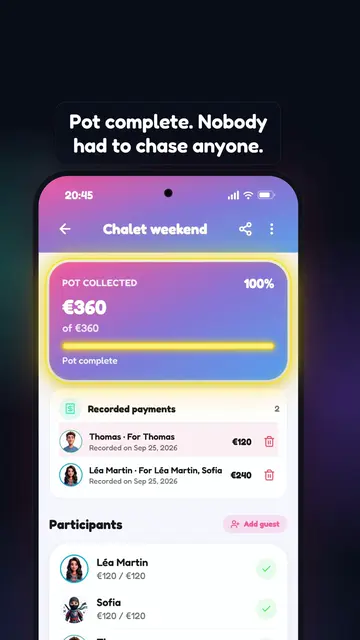
Léa organizes a chalet weekend: €360, 3 spots. Sofia and Thomas sign up through the link, and the app tracks the pot and reminds Thomas so she doesn't have to.
Video description
Overtitle: “EPISODE 8 · THE CHALET”. Music, no voice-over. Shot by shot, with the main on-screen text:
- Three friends: Léa, Sofia and Thomas. Chat bubbles: “Did you pay?”, “How much was it again?”, “I’ll send it tomorrow”. Caption: “Organizing a weekend means chasing everyone.”
- Léa’s phone, “New event” screen: “Title” “Chalet weekend”, “Price” “Total price” 360 €, “Limit number of spots”: 3, then “360 € ÷ 3 spots = 120 € per person” and “Create”. Caption: “Léa creates the weekend: €360, 3 spots.”
- Léa shares the event link (billfighters.fr/e/k7x2qd). On Sofia’s and Thomas’s phones: “Chalet weekend”, “Upcoming”, €360, “Chalet Les Aiguilles, Chamonix”; each of them taps “Join”. Caption: “She shares the link. Sofia and Thomas sign up.”
- “Record a payment”: “Amount” 240, “Paid by” Léa Martin, “For” Léa Martin and Sofia, “Total covered: €240 · €120/person”, “Save”. The “Pot collected” goes up to €240 of €360. Caption: “Léa records her payment, for herself and for Sofia.”
- Léa taps “Remind unpaid participants”: “Payment reminder — Send a reminder to the 1 participant(s) who have not paid their share yet? — Cancel · Confirm”. Thomas’s locked phone, 20:45: BillFighters notification “Payment reminder — Don’t forget your share of 120.00 EUR for Chalet weekend”. Caption: “Thomas forgets? The app reminds him in Léa’s place.”
- “Chalet weekend”: Thomas records his share (“Thomas · For Thomas”, €120). “Pot collected”: €360 of €360, 100%, “Pot complete”. Participants Léa Martin, Sofia and Thomas: €120 / €120. Caption: “Pot complete. Nobody had to chase anyone.”
- “Another option” card: an event without a pot. “Event cost” €360, “Event total price”, “Add to group expenses” button; participants at €0 / €120. Bubble: “visible in the balance”. Caption: “No pot? The cost can go into the group’s balance instead.”
- Locked screen, 18:00: BillFighters notification “Tomorrow: Chalet weekend — Chalet Les Aiguilles, Chamonix”. Caption: “The day before, everyone gets a reminder.”
- End card: “BillFighters — May the best not pay! — Free · iOS and Android”.
A date, a place, a price. Everyone sees what they owe, you see who has paid. Spots, waitlist and sharing are the app's job.
Free · iOS and Android · an event is created inside one of your groups.
What the event handles for you
The four things that always go wrong when ten people organize something.
Price per person or total price
Set a price per person, or a total that the app divides among attendees. Everyone's share goes into the group's accounts, so it counts alongside the debts already running. An event can also be free.
Everyone sees their shareLimited spots, automatic waitlist
Ten spots, twelve keen people: the last two go on the waitlist, in sign-up order. If someone drops out, the first in line takes the spot automatically and gets a notification.
Automatic promotionShared pot and payment tracking
You see in real time who has chipped in and who still owes. The app tracks the payments, it never handles the money: you mark what you received, and everyone sees the same total.
Who paid, who still owesGuests without the app
Someone without the app can be added to the event by the organizer: their seat is counted, their share too, and they claim their profile the day they install the app.
Seat and share counted
What it looks like in the app
Three screenshots from the Events tab.
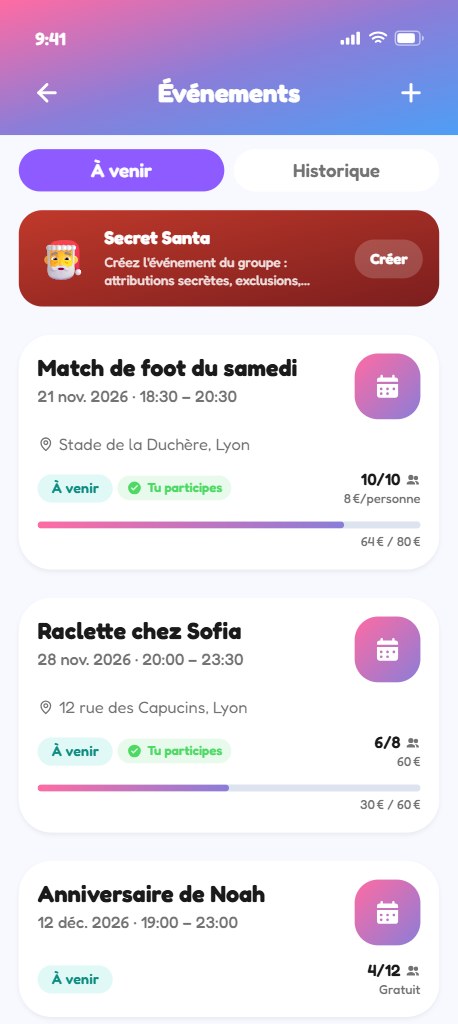
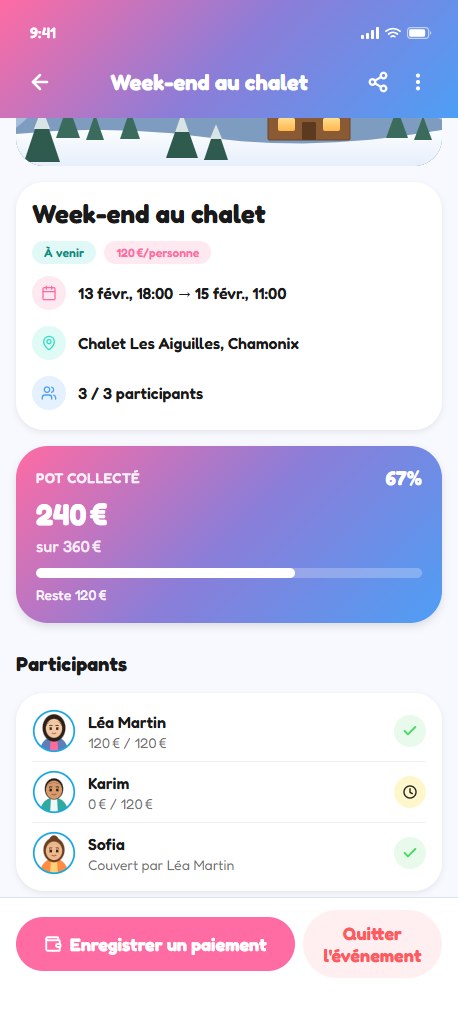
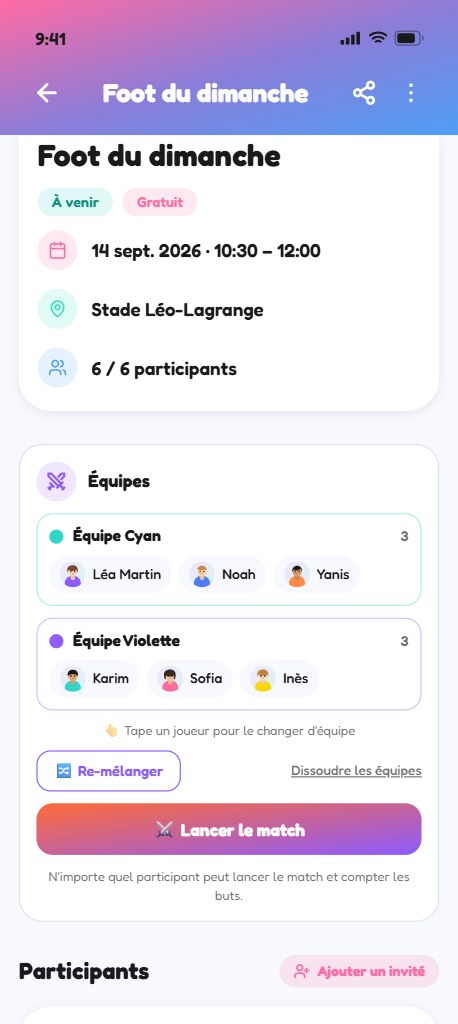
How it works
From creation to the share link, in four steps.
Create the event
Inside one of your groups: title, date, place, cover image. Then the price — per person, total, or nothing at all if it's free.
Open the spots
Set the number of spots if the venue is limited. Beyond that, the waitlist takes over on its own, in sign-up order.
Track the payments
Everyone sees what they owe. You mark what you received, the total updates for everyone, and the shares go into the group's accounts.
Share the link
For people outside the group, the app creates a share link: they can see the event even without the app, and you can revoke it whenever you want. One more tap and the date lands in their calendar.
Special events
Two formats that exist only because the app can also draw lots.
The team match, drawn at random
Sunday football, pétanque, karting: from the event, the app draws the teams at random among the attendees. Nobody picks, so nobody argues. During the game the score lives in the app, and every goal is credited to the player who scored it.
Random teams · live scoreSecret Santa
A group admin creates the party, sets the exclusions so couples never draw each other, then runs the draw. Each person only discovers who they are gifting; the organizer keeps an overview, marked as a spoiler, to sort out a latecomer. After that the gift is tracked with photos, from the idea to the wrapped parcel.
The season runs from November 1st to December 25th. Secret Santa is already in the app: it opens on November 1st, in the Events tab.
The season is open until December 25th: Secret Santa is waiting in the Events tab of the app.
From November 1stEverything about Secret Santa →
Frequently asked questions
Create the event in the group, then pick a price per person or a total to divide among attendees. Everyone sees their share, and that share goes into the group's accounts: at the end, the app says who owes what to whom, with nobody redoing the math.
The BillFighters pot tracks the payments, it never handles the money. People pay you the way you usually do, you mark it in the event, and everyone watches the same total go up. No account to open, no fee taken.
The extra people go on the waitlist, in sign-up order. As soon as an attendee drops out, the first in line takes the spot automatically and gets a notification. You never have to arbitrate.
From the event, the app draws the teams at random among the attendees, then keeps the score during the game. And if you want to decide who pays for the drinks afterwards, one of the app's games settles it: the group first votes on the rule — winner pays or loser pays.
Your next event, without the spreadsheet
Create a group, invite your friends, start the event. Shares, spots and the pot are the app's job.
Free: 10 groups, unlimited draws, 3 currencies. Premium adds 25 groups, 54 currencies, receipt scanning and PDF export.